Showing posts with label Code. Show all posts

Note: When is a reference a copy?

In C#, often I find it easier to reference objects by a shorthand than to call the exact place I need it from, such as the case of:
    Circle c = circles[i];
    someValue = c.getNumber()
    c.callMethod();

However, what happens when you actually want to copy the obhect entirely, in the same vein as int i = j;?
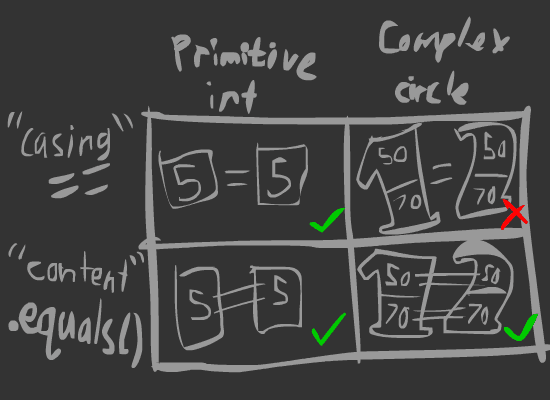
Before doing this, understand that ^. Object =/= values, they are unique.
All primitive data types copy when using = by default, whereas complex data types such as objects will reference instead. In the case of objects, in order to create an entirely new duplicate object you would call a copy() function (or at the very least something that fulfills the same role) that effectively creates a new object and assigns all of its primitive values to be the same as the object it is copying. The following would print out "objects are different".
    Circle c = circles[i].copy();
    if (c == circles[i])
    {
        Console.WriteLine("objects are the same");
    }
    else
    {
        Console.WriteLine("objects are different");
    }

And for the fun of it, the same in Java:
    String notCSharp = new String(arrayStrings[i]);
    if (notCSharp == arrayStrings[i])
    {
        System.out.print("objects are the same");
    }
    else
    {
        System.out.print("objects are different");
    }

And that's about that.

Actually looks like a UI

Or is that an UI. Oh english you so funny sometimes. Not much to report today, except this video - in dire need of needing to actually look nice. It also scales with phone size (see below).


Turns out GUI doesn't scale with different resolutions. But no matter - maths saves the day:

float tx, ty, width, height, multiplier;
multiplier = (1 / baseScreenHeight) * Screen.height;
width = g.pixelInset.width * multiplier;
tx = g.pixelInset.x * multiplier;
ty = g.pixelInset.y * multiplier;
height = g.pixelInset.height * multiplier;
g.pixelInset = new Rect(tx, ty,
    width,
    height);


Basically it just takes the original resolution (baseScreenHeight) which is set as a constant equal to whatever you set as the screen height for testing (such as 480 in a 320x480 screen). Then it does maths and changes the PixelInset of the GUITexture to the new screen resolution. Yay.

There's also a whole bunch of other stuff to consider, but I won't go into that - read this article. Especially the bit about density independence.

Decisions, decisions...


That's a post title that will be occurring many times in the future. Things like how do I want the camera to move and zoom when the the user fires signals, and should the user be able to pan the camera around during the plan/wait phase.

I think it would be easiest to just ignore manual panning, as it simplifies things as well as makes it easier to keep track of everything. The camera max zoom will probably be bound as by the area needed to see all nodes, and the minimum zoom will be based on action - planning phase will allow zooming in all the way to the centre node, but during testing will follow the minimum bounds required to show all moving bits.

Moving controls to the phone


oh lawd.
Spent ages trying to figure out how to change the pointer from following the mouse to following the touchscreen.

Then I found this and that.

Tried to get the pointers (made multiple of them, one for each possible number of touches) to work with multi-touch, causing many, many array exceptions, since the size of Input.touches[] changes based on how many touches it detects. And when that didn't work, attempting to formulate some way of using ray casts from the tapped position to check against the collision of the entities.

Then I found this.

The moral of this story? Search the documentation before you jump onto the internet looking for silly answers to simple solutions. Also to note, is that sometimes Unity Remote 4 will stop working with unity when you run it. This is fixed by restarting Unity, at least its worked for me when it does happen (seems to be caused by things such as phone disconnection during gameplay). Also, Unity Remote 4 does actually support touch controls properly from the script, not just a translator for PC controls (meaning it does actually register Touch Phases).

More Os and Xs

Previously on STR.

With the -amazing gameplay- sorted out I need to work out the rest of the stuff. This means UI and graphics and possibly sound, and whatnot.

I think it would be great for the game to actually end when a player wins, and to restart after finishing. Additionally I want a line to be shown indicating where the win has occurred and some pop-up text declaring who's won or not. A score counter would be useful too.

TacTicToeTwo

This is a continuation from this post. I'll recall, from the that blog post for posterity:
  1. Player x selects a space on the grid to place their block.
  2. Game checks to make sure that space is empty.
  3. Game places block on that space, updates the grid in code.
  4. Game checks if a 3-in-a-row has occurred. If true, step 5, else step 6.
  5. Game stops, congratulates Player x on a Win.
  6. Game checks if all spaces are filled, in which case it is a Draw.
  7. Otherwise, Game swaps control to Player y, and moves back to step 1 with x and y reversed.

Baby Steps

Unless someone has amazing godlike talent, or are the product of super secret government experiments, of which I count myself as being in neither, it is safe to assume no one can immediately become an expert on things. Now I'm not going to say I'm new to programming, but to make games, like anything takes a lot of practice.

Therefore, with my amateur programming knowledge, questionable art skills and dubious musical capabilities, I am going to attempt for my first 'project' to build something simple. Really simple. Something I shouldn't be able to feasibly mess up beyond all recognition.

So I'll start with good old Tic Tac Toe, aka Noughts and Crosses. And for extra kicks, try to get it working as a simple App on Android (there's a legitimate reason for that!).
Disclaimer: This is written as a semi-tutorial, documenting my own failures and success at getting this working. Feel free to follow along, but don't expect a miracle, and don't expect to learn anything particularly new, or interesting. And certainly do not take this as a standard by which you should go about doing anything. Do not. Donot. Donut.